%20(1).svg)
.png)

Vulnerabilities in embedded systems often emerge long before deployment; they take root during the initial development and image-building phases. Deploying Over-the-Air (OTA) software updates to a fleet of embedded Linux IoT devices is highly risky. One bad line of code can brick thousands of devices in the field.
This is why software supply chain security deserves as much attention as OTA delivery itself. Specifications like SLSA v1.2 (Supply-chain Levels for Software Artifacts) define a rigorous standard for producing verifiable, tamper-resistant software artifacts that organizations can trust. Few embedded software vendors like the qbee-agent today meet the highest SLSA v1.2 levels for both the source and build tracks, and that is increasingly the standard the industry should be striving toward.
To ensure your update system is secure, resilient, and scalable, implement these 10 industry best practices for OTA updates.
Monitor and report: Collect granular metrics on every update attempt, including success/failure rates, error codes, download times, and post-reboot device health.
Integrate OTA into CI/CD: Automate your image building, signing, and publishing. Treat firmware like any software artifact by maintaining traceable metadata (SBOMs, changelogs, versioning).
Plan for long-term maintenance: Maintain update compatibility across changing hardware revisions, manage cryptographic key rotation, and commit to long-term lifecycle security patches.
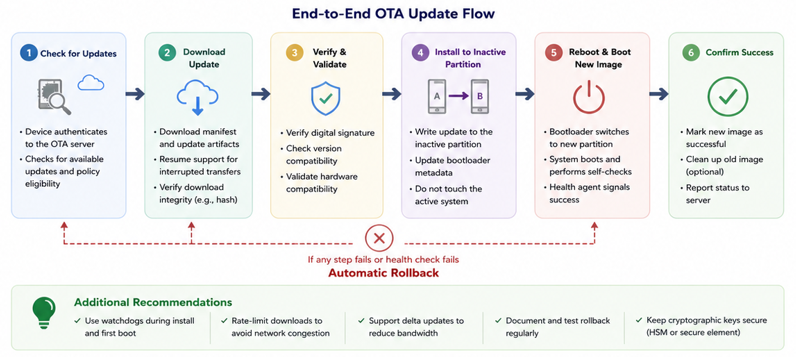
An update must never brick a device. Every single stage—from download and verification to installation and boot—must be designed to tolerate failure and recover automatically.
By building an end-to-end OTA update flow that checks, downloads, validates, installs to an inactive partition, reboots safely, and confirms success before finalizing, you ensure your fleet stays secure and operational for years to come.
Learn More: Design Considerations for Secure OTA Updates in an Embedded Linux Environment
.png)